Our guide breaks down the top 10 AI automation tools, helping you find the best fit for your needs—whether you're a solopreneur or an enterprise looking to scale.

Take your workflow automation to the next level with AI
If you’ve been following the AI boom, you’ve likely noticed there are a few different types of tools that let you harness artificial intelligence in various ways. Some of them (like ChatGPT or Claude) are chatbots that you can have conversations with, do research, and get on-demand answers. Others are in-product copilots, like GitHub Copilot or Notion AI, that help you complete tasks within a product faster. But the most exciting category, in our view, is the budding new class of AI automation tools. They work on your behalf as you sleep and take care of all of the mundane, repetitive tasks in your business.
But there are lots of them! And what’s more — new categories are already emerging within this group of tools. So we wrote this guide to dive into the ten best, grouped by primary use case, to help you choose the one that’s right for you. Whether you're a business owner looking to simplify your operations or an enterprise team aiming to scale your processes, chances are you’re going to want to use at least one of these tools.
We'll start with a brief overview of what to look for in an AI automation tool, then walk through how to evaluate the emergent categories in this space, and finally dive into our top tool picks.
TL;DR
Here's a quick summary of the complete list we'll be walking through:
AI-integrated workflow automation tools
1. Relay.app: The most modern and easiest-to-use AI-integrated workflow automation tool with the best support for AI and human-in-the-loop workflows.
2. Zapier: The largest integration provider with over 7,000+ connected apps, offering select AI model integrations for enhanced workflow automation.
3. Gumloop: A powerful AI-first platform for automating complex, data-intensive workflows, such as SEO blog post generation and invoice processing.
AI agent platforms
4. Lindy: A versatile AI agent platform enabling the automation of human-like business processes across various functions.
5. Respell: A customizable AI agent platform with a sales and marketing focus, supporting workflows like web research and content creation.
Browser-based assistants
6. Bardeen: An AI-powered browser extension designed to automate repetitive browser tasks, from web scraping to data entry.
7. Magical: A lightweight AI assistant that automates data entry and messaging across multiple platforms directly from your browser.
Enterprise tools for knowledge management
8. Cassidy: An AI-powered tool for creating custom knowledge-based assistants and simple workflows to streamline processes like customer support and sales.
9. Stack AI: An enterprise-focused platform for retrieval augmented generation (RAG) workflows, automating knowledge base interactions and document analysis.
10. Taskade: An AI-enhanced collaboration tool that automates project management and team workflows across shared workspaces.
How I evaluated these platforms
The main goal of an AI automation tool is to save you and your team time, money, and increase your productivity — but you have to pick the tool that’s the right match for your use case and has all of the capabilities you need.
Let's quickly outline what makes a great AI automation tool:
Ease of use: A Ph.D. in computer science or an encyclopedic user manual isn’t needed to start building powerful, automated workflows.
AI capabilities: Advanced AI features like natural language editing and automated web browsing are native to the platform, and you can easily switch between multiple different models.
Integrations: Connections to your existing tools and platforms are a breeze and new integrations are consistently being added.
Customization: It’s flexible enough to handle more niche, specific use cases for your business without hacky workarounds, for example, by incorporating your internal knowledge base.
Scalability: Grows with your company. You won’t have to jump to a new platform in a few months or years as your task volume increases or you add more members to your team.
Cost: Doesn’t break the bank to automate all of your tasks and workflows.
Not every AI automation tool will check all the boxes in this list, but these bullets provide a helpful high-level framework for evaluating these tools.
In addition to these general requirements, new categories are emerging within this space that cater to specific business needs.
The right category of tool for you depends on your specific automation needs, the scale of your operations, and your team's technical capabilities. Let’s dive into each category briefly.
🔀 AI-integrated workflow automation tools
These no-code tools are designed to connect a wide range of apps and automate complex workflows at scale — with AI capabilities available at every step. You might already be familiar with tools like Zapier and Make, but there are a host of new workflow builders developed with AI at their core that expand the definition of what’s possible with no-code workflow automation.
Unlike standalone AI tools, which focus on specific verticals, industries, and tasks, AI-integrated workflow automation tools offer a more comprehensive and flexible option.
You might want to look for a tool in this category if:
Seamless integrations are important to your business and you want to seamlessly connect a wide range of apps
You’re looking to automate complex workflows and need a more comprehensive and flexible option compared to more narrow-focused AI solutions
Having robust, advanced AI actions powered by a library of the top AI models, which you can easily swap in and out, is needed
Automation at scale is important — you’re looking to streamline a high volume of tasks and workflows
🧑💼 AI agent platforms
AI agent platforms let you create intelligent assistants that can autonomously complete tasks, make decisions, and interact with various systems on your behalf. Unlike traditional automation platforms, which are task- and rule-based, AI agent platforms are built to handle ongoing, adaptive processes that require continuous learning, complex reasoning, and human-like tasks.
They are ideal for businesses that want to delegate entire processes or interactions to an AI agent rather than relying primarily on rule-based automations.
You might want to look for a tool in this category if:
You need an AI-powered agent that can autonomously make decisions and take actions without constant human oversight
You want to integrate AI into more ambiguous workflows where adaptability and dynamic responses are helpful
You're looking to enhance customer engagement, sales, or virtual assistant tasks where AI agents capable of learning and improving over time are valuable
🌐 Browser-based AI assistants
Browser-based assistants are AI-powered tools that live within your web browser and help automate tasks across your open tabs. These assistants allow you to streamline repetitive actions, data entry, and other simple task-based automations without switching between different applications.
They are especially useful if you want to automate tasks like filling out forms, extracting data, or writing communication without leaving your web browsing experience.
You might want to look for a tool in this category if:
You spend a lot of time copying/pasting data across tabs in your browser and need to automate tasks like data entry or collection
You're looking for a simple, lightweight solution that integrates with your browsing experience without heavy setup or extensive app integration
You need real-time AI-powered assistance for tasks like scraping data, writing emails, or updating applications
📚 Enterprise knowledge management tools
Enterprise knowledge management tools are designed to help you efficiently organize, retrieve, and leverage critical information across various data sources.
Unlike traditional knowledge management systems that rely on manual input and static information repositories, AI-powered knowledge management tools continuously update and intelligently process information from your data sources, making it easier for your teams to harness your business’s most relevant data in real time.
These tools are ideal for teams managing complex information workflows across departments.
You might want to look for a tool in this category if:
You need to centralize your organization's knowledge and make it easily accessible to all team members
You want to automate the discovery, categorization, and retrieval of information without relying on manual processes
You're looking to improve collaboration and decision-making by ensuring that the most accurate and up-to-date information is always available
You need to streamline information management at scale, especially for teams or enterprises handling large volumes of data and documentation
Now that you have a better understanding of the AI automation landscape, let's dive into our list of the 10 best AI automation tools of 2026.
The 10 best AI automation tools of 2026
1.
Relay.app
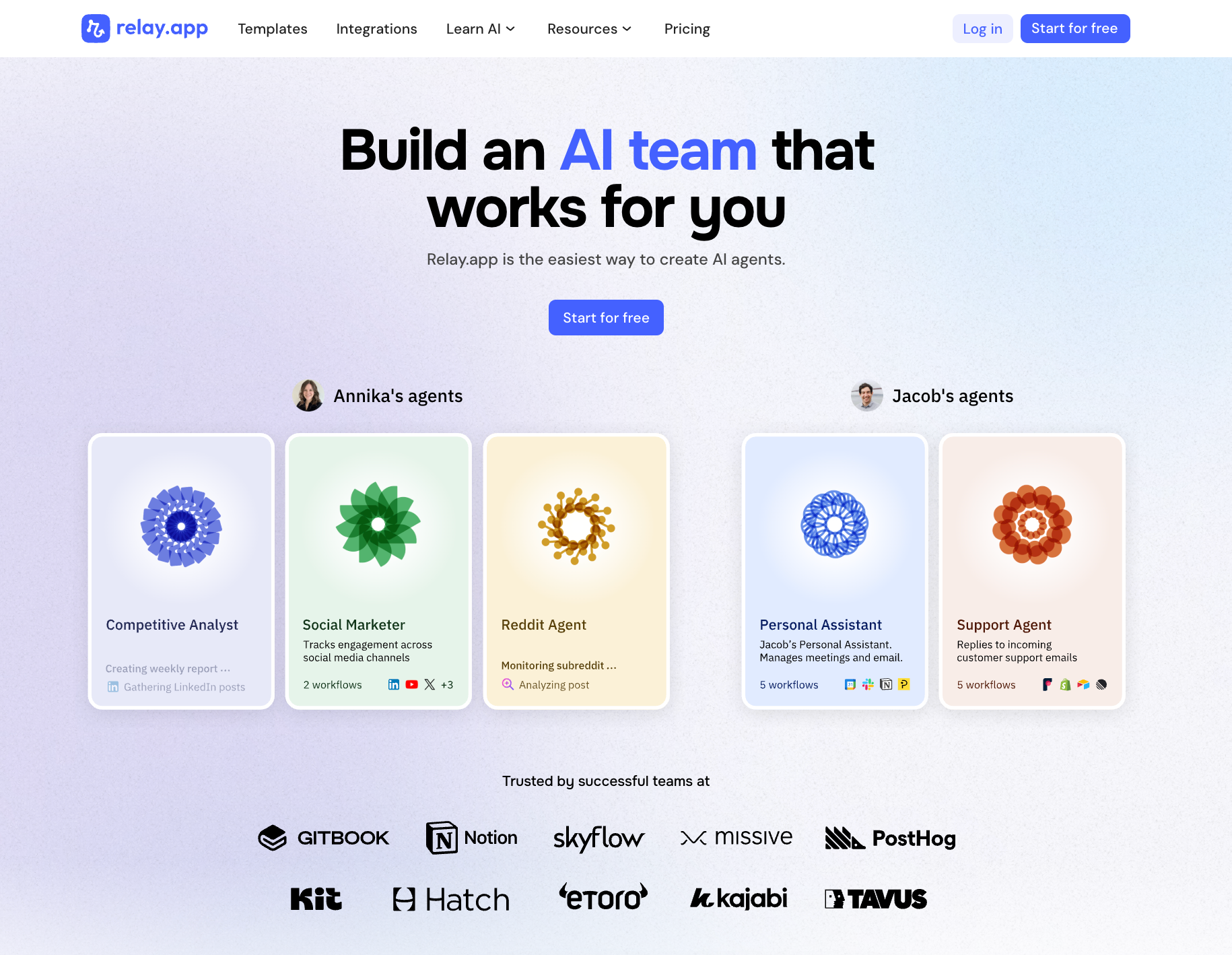
Relay.app stands out because it is incredibly easy to use. Non-technical users that have struggled with tools like Zapier and Make.com can create AI agents in minutes. To create agents in Relay.app, all you need to do is explain what you want in plain language, and Relay.app will create the agentic workflow for you. This model combines the ease-of-use of chat with the predictability and reliability of workflows. Relay.app also has the strongest human in the loop features that keep you in control and ensure that you can trust the work of your agents.
✅ Pros
Ease of use for all types of users to create their own AI agents with a simple chat experience.
Visual workflow representation that gives you confidence in how your AI agent will work on tasks.
Human-in-the-loop features for reviewing or approving actions, so you maintain control over what the AI does.
Built-in AI credits and model integration – use OpenAI, Anthropic, Gemini and more, without manual API keys.
❌ Cons
Integration library still growing – as a newer platform, it may not yet have every app integration that incumbents like Zapier offer.
💰 Pricing
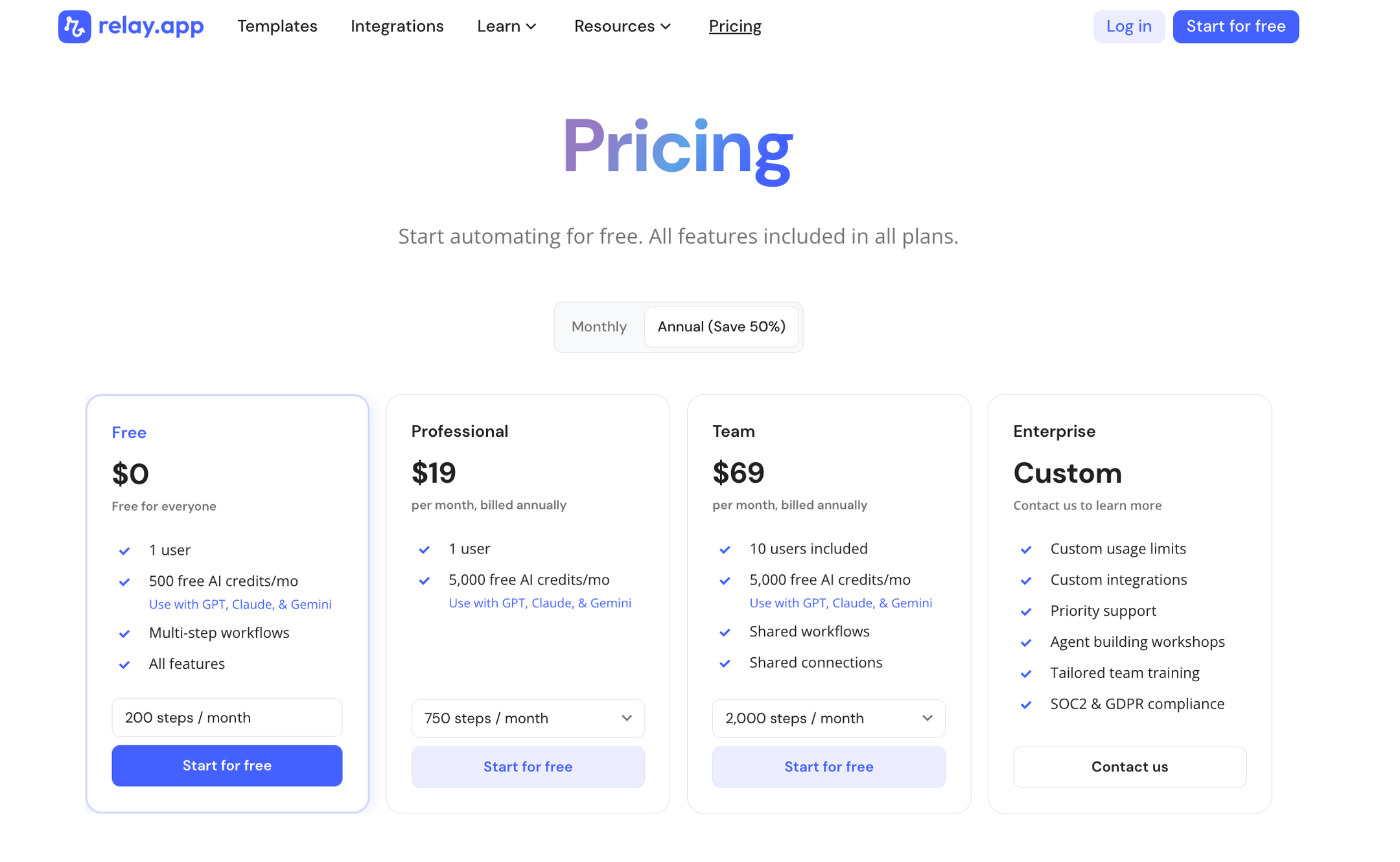
Free tier: Yes – includes 200 automation steps and 500 AI credits per month.
Professional: $19/month billed annually (generous for single users or small teams).
Team: $69/month billed annually (higher capacity and collaboration).
Enterprise: Custom pricing for large organizations.
Takeaway
If Relay.app supports the integrations you need, it should be your first choice for building AI agents. Users praise its exceptionally easy UI and smooth experience, which is why Relay is often highlighted as the easiest-to-use AI agent builder for beginners.
2.
Zapier
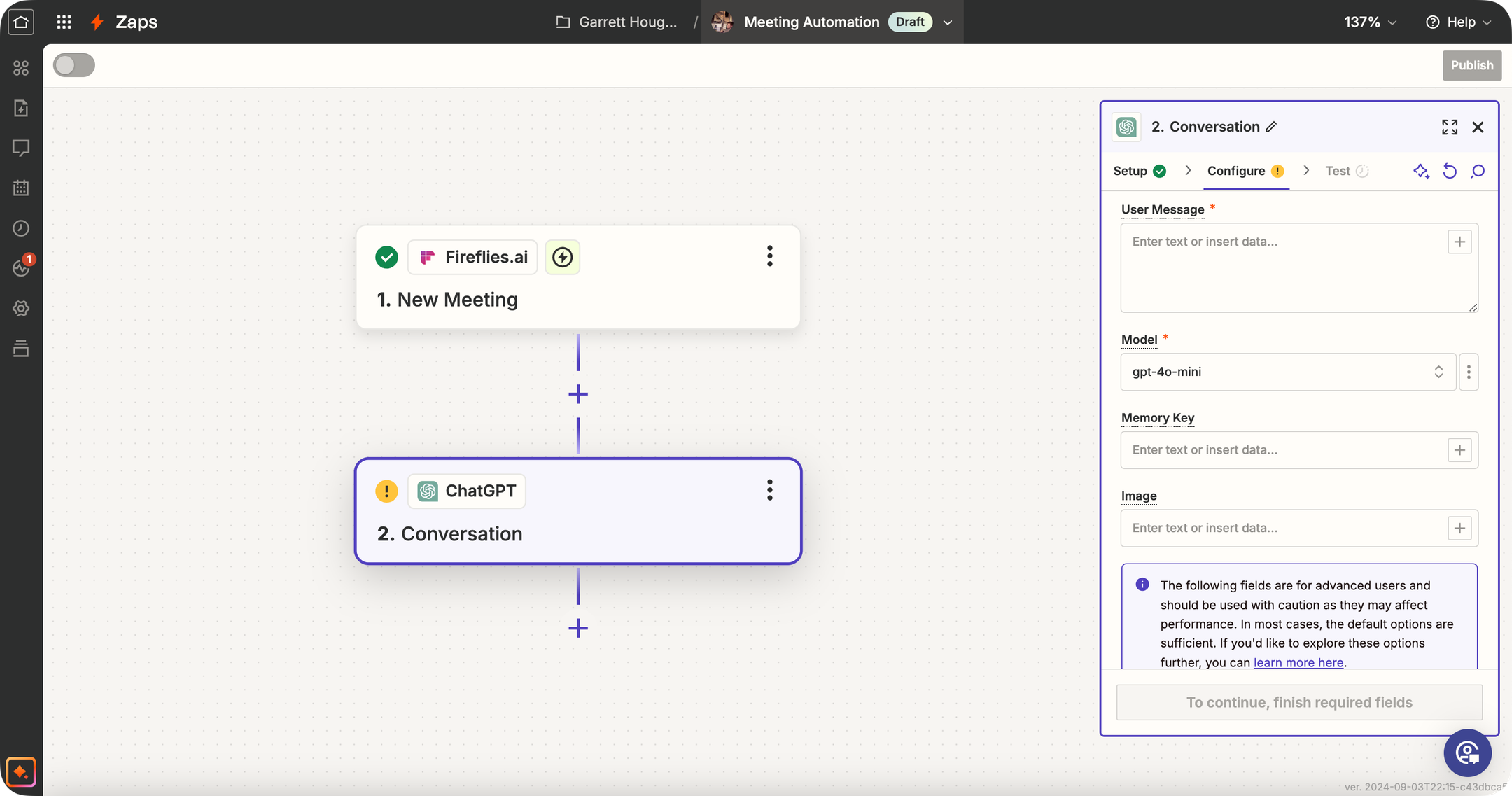
Zapier is a very well-known automation tool (the "OG" of no-code workflows) that has significantly expanded its AI capabilities. Traditionally, Zapier connects your apps: "When X happens in app A, do Y in app B." Now, Zapier offers dedicated AI Agents, AI Chatbots, Canvas (for visually designing automation systems), and MCP (Model Context Protocol) for connecting AI tools to its ecosystem. Zapier isn't an AI-specialized platform like some others here, but its strength is the 8,000+ app integrations it supports. This means you can trigger AI agents based on almost any event (new email, form submission, CRM update—you name it) and then have the AI perform an action or generate content as part of the workflow. Use cases: e.g., automatically summarize every new support ticket with GPT and post it to Slack, or generate a draft email reply when a lead comes in, etc., all using Zapier's workflow editor.
✅ Pros
Massive integration ecosystem: Zapier connects with over 8,000 apps, so your AI agent can interact with nearly any tool your business uses — unmatched in the industry.
Mature product and platform: Zapier has a reputation for dependable execution of workflows and extensive documentation + community support.
Extensive template library: Thousands of pre-built Zap templates (including many with AI) to get you started quickly.
Expanding AI toolkit: Now offers dedicated AI Agents, Chatbots, Canvas, and MCP support alongside its core automation platform.
❌ Cons
AI agent capabilities not as advanced: Zapier's AI features are still maturing compared to specialized AI agent builders.
More difficult to evolve an older product: Zapier's legacy as an if-this-then-that tool can make it harder to match the ease of use that cutting-edge AI demands.
Fragmented pricing for AI features: AI Agents and Chatbots are separate paid add-ons on top of the base platform, which adds complexity and cost.
💰 Pricing
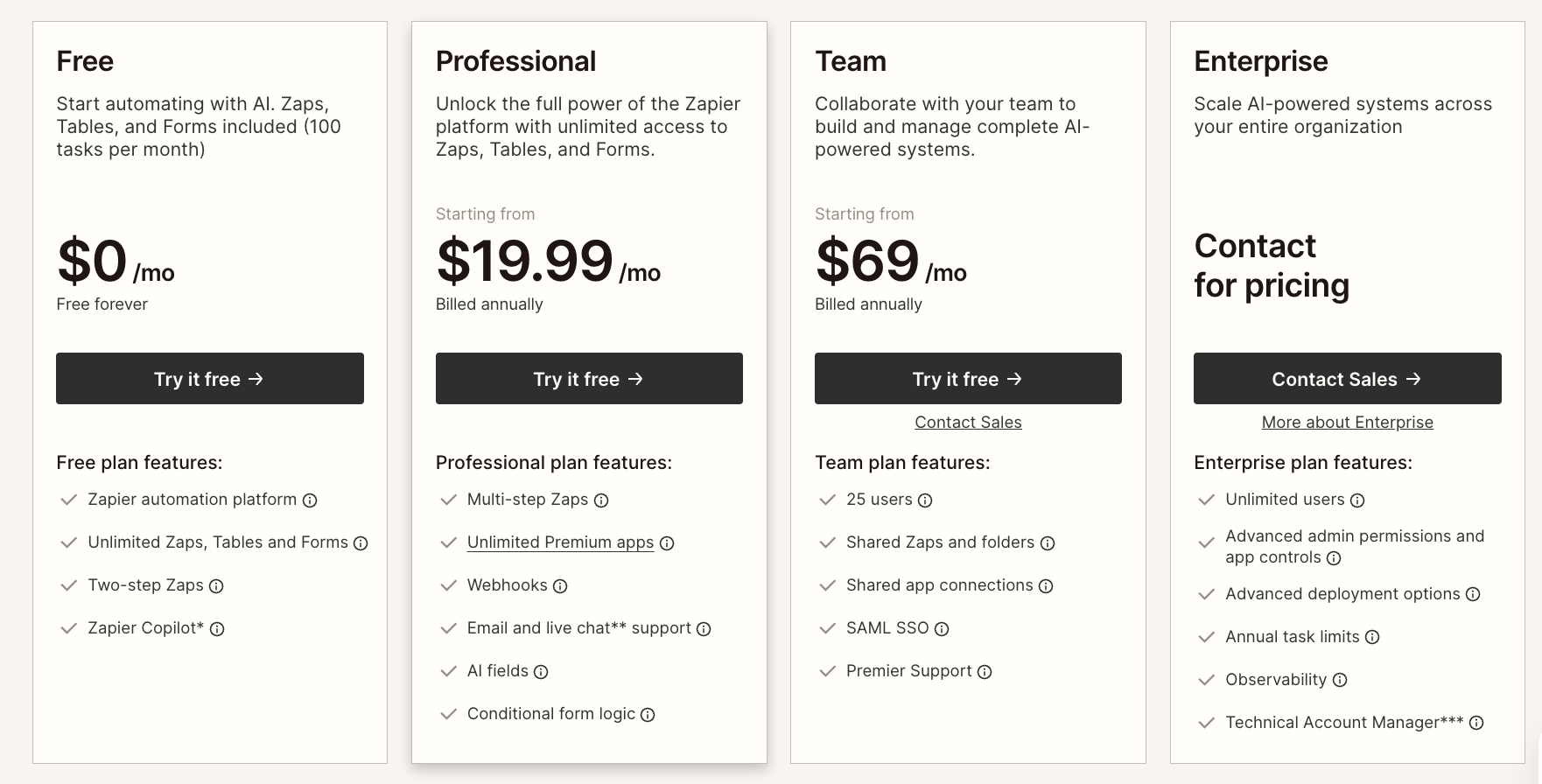
Free Tier: Yes – 100 tasks/month with two-step Zaps, plus Tables, Forms, and Zapier MCP included.
Professional: Starting from $19.99/month (billed annually) – multi-step Zaps, unlimited premium apps, Tables, Forms, and MCP included.
Team: Starting from $69/month (billed annually) – 25 users, shared Zaps, SAML SSO.
Enterprise: Custom pricing – unlimited users, advanced admin controls, observability.
AI Agents add-on: Free (400 activities/mo) or Pro ($33.33/mo for 1,500 activities).
Chatbots add-on: Free (2 chatbots), Pro ($13.33/mo for 5 chatbots), or Advanced ($66.67/mo for 20 chatbots).
Takeaway
If you already use Zapier for automation, it's a natural step to experiment with its AI features. It's best for scenarios where connecting different apps is the priority, and AI just plays one part in the workflow. It's a safe choice if you use niche tools that aren't covered by other platforms in this category.
3.
Gumloop
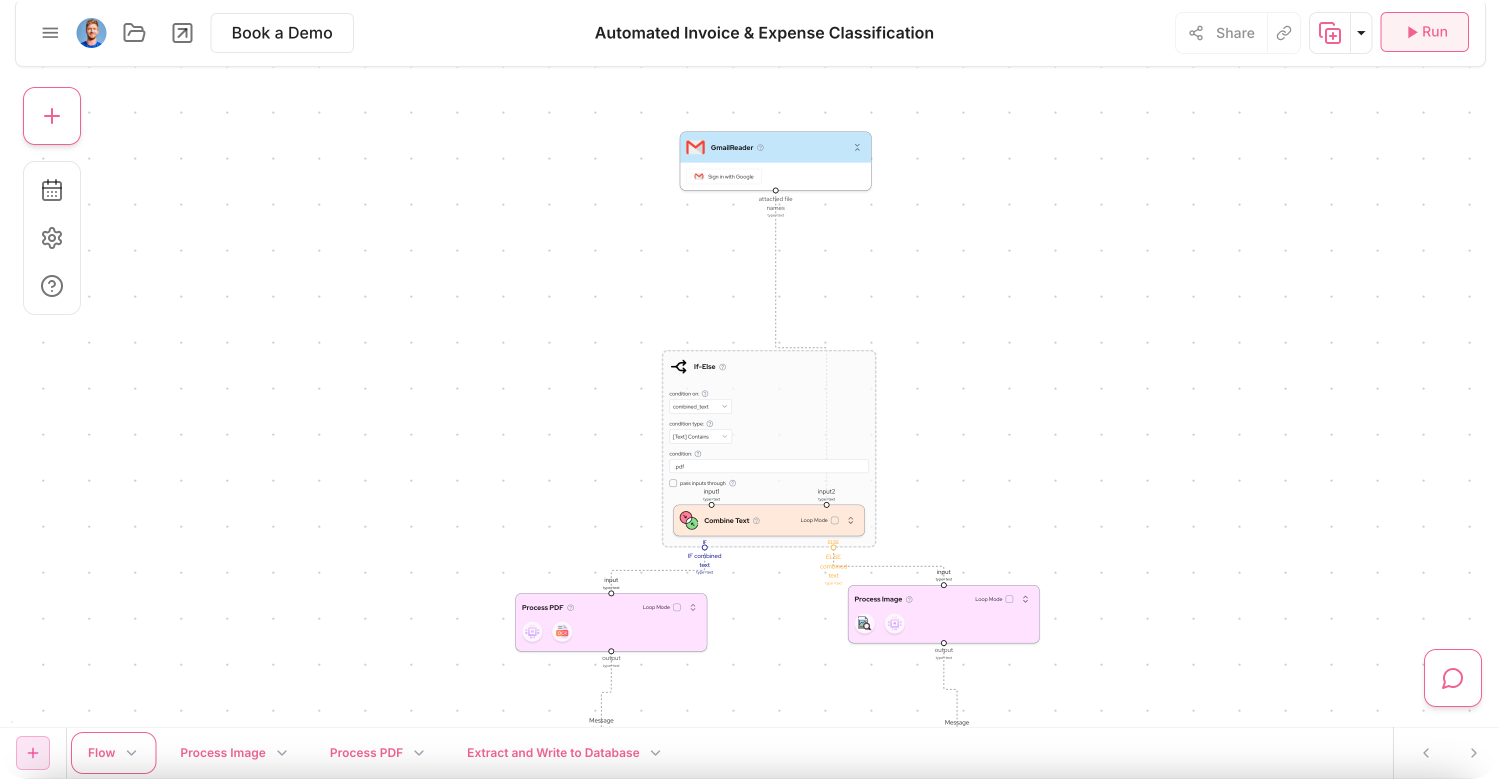
Gumloop is an AI agent platform where teams build, deploy, and manage specialized agents using a visual canvas. Backed by a $50M Series B led by Benchmark, Gumloop lets you drag, drop, and connect modular nodes to orchestrate multi-agent workflows for sales, support, data analysis, and operations. It includes built-in access to multiple AI models (OpenAI, Anthropic, Gemini, DeepSeek, and more) under a single subscription with no per-model fees, plus features like MCP nodes, custom nodes, and a Workflow Builder Agent. Agents can be interacted with directly in Slack (with Teams, Gmail, and WhatsApp coming soon). Used by companies like Instacart, Webflow, Shopify, Gusto, Samsara, and Ramp, Gumloop is enterprise-ready with SOC 2 Type II and GDPR compliance, VPC deployments, role-based access controls, and Gumstack — a dedicated AI security gateway for monitoring and auditing all AI activity.
✅ Pros
Multi-agent orchestration: Visual canvas for building and connecting specialized AI agents across sales, support, data, and ops.
All AI models under one subscription: Access OpenAI, Anthropic, Gemini, DeepSeek, and more with no per-model fees.
Slack-native interaction: Team members can tag @Gumloop in Slack to interact with agents like co-workers.
Enterprise-grade security: SOC 2 Type II, GDPR, VPC deployments, RBAC, audit logging, and Gumstack AI gateway for centralized monitoring.
❌ Cons
Steeper learning curve: The node-based canvas is powerful but takes more time to master than simpler chat-based tools.
Requires technical thinking: Even though it's no-code, understanding programming logic helps you use it effectively.
More complex setup: Building multi-agent workflows requires careful planning — not as plug-and-play as lighter alternatives.
Credit-based pricing can be hard to predict: Usage costs depend on how many credits your agents consume.
💰 Pricing
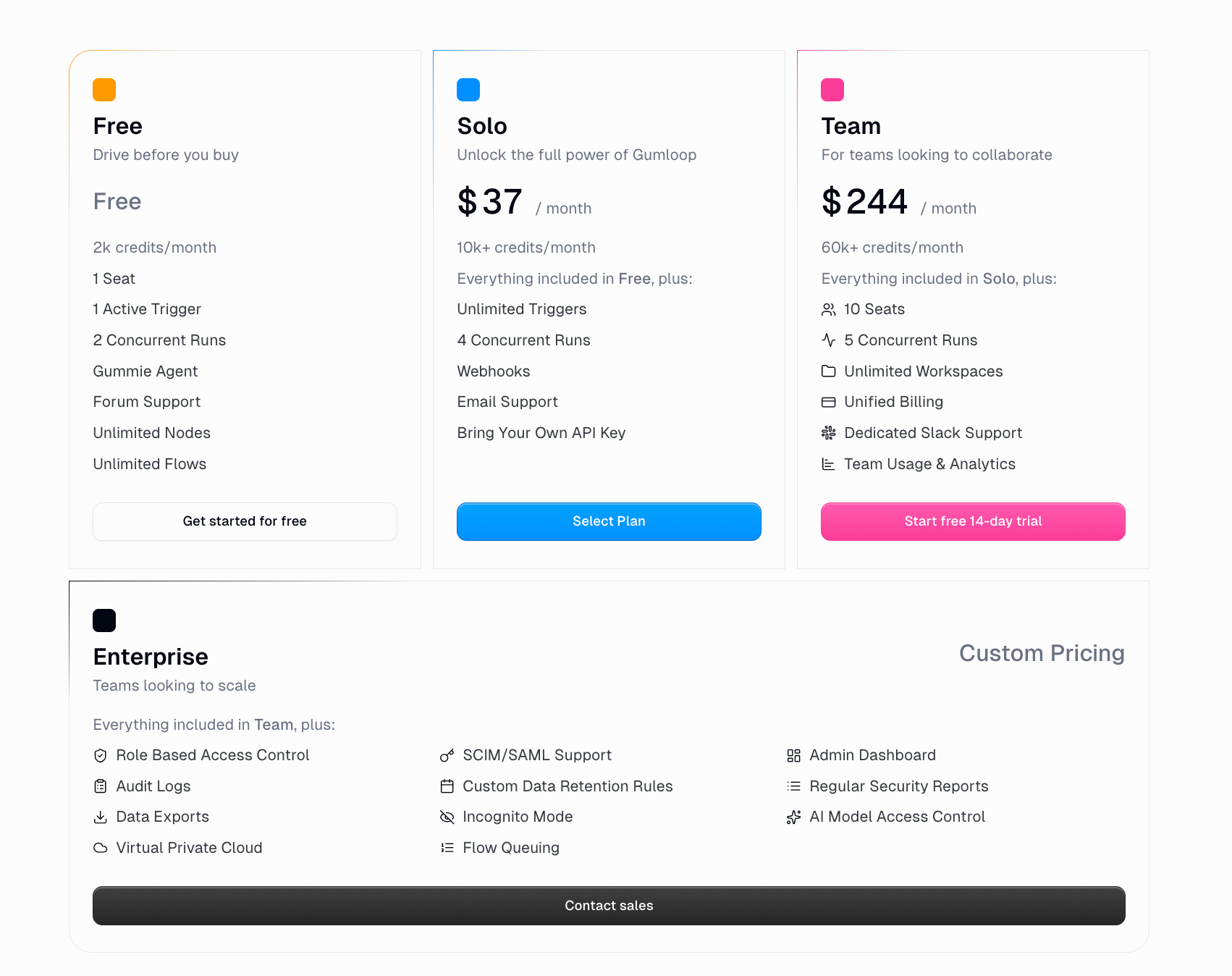
Free Tier: Yes – 5k credits/month, 1 seat, 1 active trigger, 2 concurrent runs, Workflow Builder Agent.
Pro: $37/month – 20k+ credits, unlimited seats, unlimited teams, 5 concurrent runs, BYOK support, dedicated Slack support (250k+ credits/mo).
Enterprise: Custom pricing – RBAC, SCIM/SAML, audit logs, VPC, AI model access control, incognito mode, custom data retention, and more.
Takeaway
Gumloop is a strong option for teams that want to build detailed, multi-agent AI workflows using a visual canvas. Its multi-model AI support, Slack-native agent interaction, and enterprise security features (including Gumstack) give it real depth for complex use cases. That said, the node-based builder requires more planning and technical thinking than chat-based alternatives like Relay.app, which lets you create AI agents simply by describing what you want in plain language.
4.
n8n
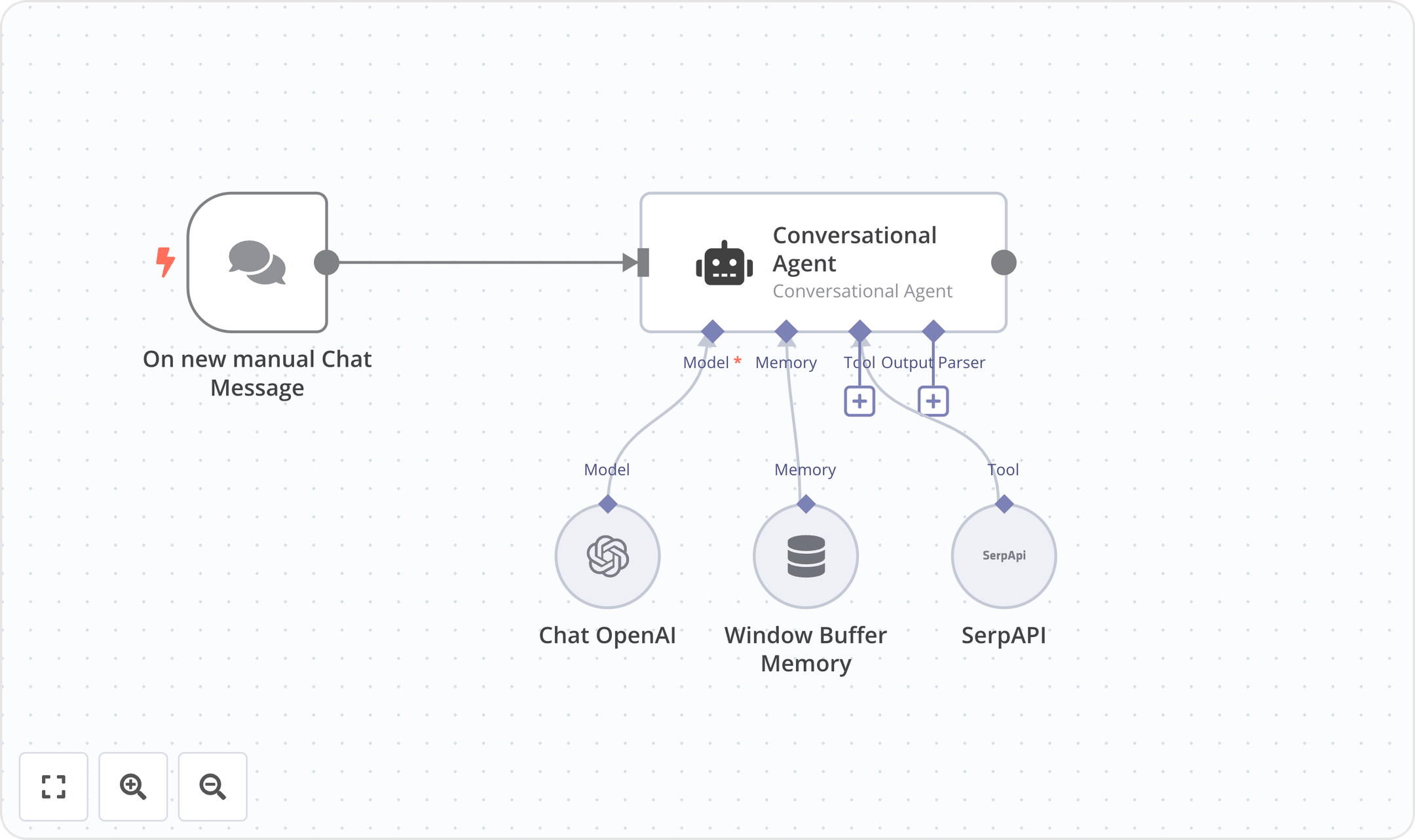
n8n is an open-source workflow automation platform built for technical teams. It combines a visual workflow editor with the ability to write custom JavaScript or Python code, giving users flexibility to build automations their way. With 500+ integrations, 1,700+ templates, and self-hosting options (via Docker or from GitHub), n8n supports use cases across IT Ops, DevOps, SecOps, and Sales. The platform features an AI Workflow Builder, debugging tools with single-step re-runs, and enterprise capabilities including SSO/SAML/LDAP, version control via Git, RBAC, and audit logging. Trusted by companies like Delivery Hero, Vodafone, Microsoft, Meta, and Wayfair, n8n boasts 179k+ GitHub stars and a 200k+ member community.
✅ Pros
Code + no-code flexibility: Write JavaScript or Python alongside a visual UI editor — no need to choose one or the other.
Self-hosting available: Deploy with Docker and access the full source code on GitHub for complete data control.
Execution-based pricing: Pay per full workflow run, not per step or task, making costs more predictable.
Large open-source community: 179k+ GitHub stars and 200k+ community members providing templates and support.
❌ Cons
Steeper learning curve: Best suited for technical users — non-technical team members may struggle with the code-oriented approach.
Limited support on lower tiers: Dedicated support with SLA is only available on the Enterprise plan.
Self-hosted complexity: Self-hosting requires managing your own infrastructure, updates, and scaling.
Big pricing jump to Business: Significant leap from €50/mo (Pro) to €667/mo (Business), which may be steep for growing teams.
💰 Pricing
Community Edition: Free — self-hosted via GitHub, standard features
Starter: €20/mo (billed annually) — 2.5K executions, 5 concurrent executions, unlimited users, 1 shared project, 50 AI Builder credits, forum support
Pro: €50/mo (billed annually) — Custom executions, 20 concurrent executions, 3 shared projects, 150 AI Builder credits, admin roles, global variables, workflow history, 7-day insights
Business: €667/mo (billed annually) — 40K executions (self-hosted), 6 shared projects, SSO/SAML/LDAP, Git version control, environments, 30-day insights, scaling options
Enterprise: Contact Sales — Custom executions, 200+ concurrent, unlimited shared projects, 1,000 AI Builder credits, external secret store, log streaming, extended data retention, 365 days of insights, dedicated support with SLA, invoice billing
Startup Plan: 50% off Business for companies with fewer than 20 employees

Takeaway
n8n is a top choice for technical teams that want the power of code with the convenience of a visual workflow builder. Its open-source DNA, self-hosting option, and execution-based pricing model set it apart from competitors like Zapier and Make. The platform shines for IT Ops, DevOps, and SecOps automation where data control and customization matter most. Teams should be comfortable with a more technical setup, and smaller teams should note the significant price jump to access enterprise-grade features like SSO and Git version control on the Business plan. For teams that want a simpler, more accessible automation experience — especially with built-in human-in-the-loop controls — Relay.app is worth considering as an easier-to-use alternative.
5.
Make
Make is a visual-first no-code automation platform that lets you design complex workflows on a canvas by connecting modules from 3,000+ apps. It supports advanced logic like branching, filtering, iteration, and error handling, making it popular with power users who need more control than simpler tools offer. Make has recently expanded into AI with AI Agents (currently in beta), an AI Toolkit, MCP server support, and 400+ AI app integrations including OpenAI, DeepSeek, and Perplexity. The platform uses a credit-based billing model where each module action counts as one credit. Make is well-suited for technical users and teams that need to build sophisticated, multi-step automations with granular control over every step.
✅ Pros
Powerful visual scenario builder: The canvas-based editor lets you see exactly how data flows through your automation — great for debugging and complex logic.
Advanced workflow logic: Supports branching, filtering, iteration, and error handling that most simpler tools can't match.
Strong integration library: Connects with 3,000+ apps, with deep action support across most of them.
Generous pricing relative to complexity: Make offers more operations per dollar than Zapier, making it attractive for higher-volume automations.
❌ Cons
Steep learning curve: Make's power comes at a cost — non-technical users typically need 10–20 hours before feeling comfortable, and concepts like routers, iterators, and aggregators take real investment to learn.
Credit billing can get expensive: Make switched from operations to a credit-based model, and AI modules in particular can burn through credits quickly if you're not careful about how workflows are architected.
AI capabilities still maturing: The next-gen agents are in open beta and pricing may still evolve.
💰 Pricing
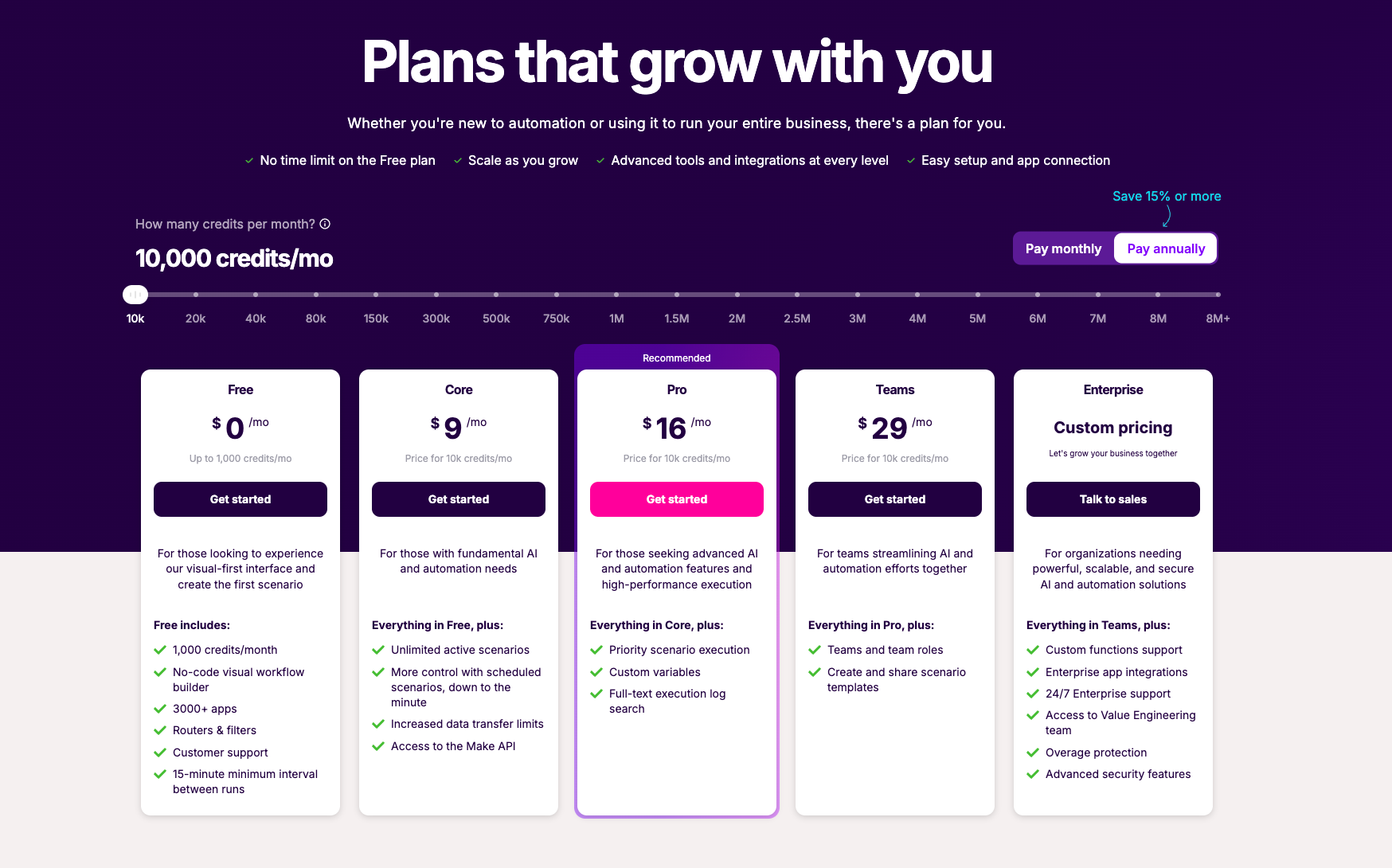
Free: $0/month – 1,000 credits/month
Core: $9/month – 10,000 credits/month
Pro: $16/month – 10,000 credits/month plus priority execution and advanced features
Teams: $29/month – 10,000 credits/month plus team collaboration
Enterprise: Custom pricing
Takeaway
Make is a strong choice for power users and technical teams who need granular control over complex, multi-step automations. Its visual canvas and advanced logic features are best-in-class for those willing to invest the time to learn them. However, the steep learning curve and credit-based billing complexity mean it's not ideal for non-technical users or teams that want to get started quickly. If you want similar visual automation power but with a much easier setup experience — especially for building AI agents — tools like Relay.app offer a more approachable alternative.
6.
Cassidy
Cassidy is an AI agent platform focused on giving automations deep business context. It connects to your company's documents, wikis, and data sources through a unified knowledge base that continuously syncs, so AI agents always act on the latest information. Cassidy offers no-code workflow creation, agentic reasoning for handling complex logic and exceptions, and cross-system execution across tools like Salesforce, Slack, and Microsoft Teams. It includes human-in-the-loop steps and guardrails for control over business-critical work. The platform is enterprise-ready with SOC 2 Type II, GDPR, HIPAA, and CASA compliance, and provides a dedicated solutions team for onboarding and implementation.
✅ Pros
• Deep business context via a unified knowledge base that continuously syncs across your documents and data sources.
• No-code workflow creation lets non-technical teams build and deploy AI agents without developer support.
• Enterprise-grade security with SOC 2 Type II, GDPR, HIPAA compliance, and SSO.
• Deploys directly into Slack, Microsoft Teams, Chrome, and other tools your team already uses.
❌ Cons
• No transparent pricing — the Business plan requires a demo call, making it hard to evaluate costs upfront.
• Starter plan is limited to 3 users and 5 agents, which may feel restrictive for growing teams.
• Heavily enterprise-focused, which may be more than smaller teams need.
• Workflow creation experience is less visual compared to tools like Relay.app that let you see exactly how your agent will work.
💰 Pricing
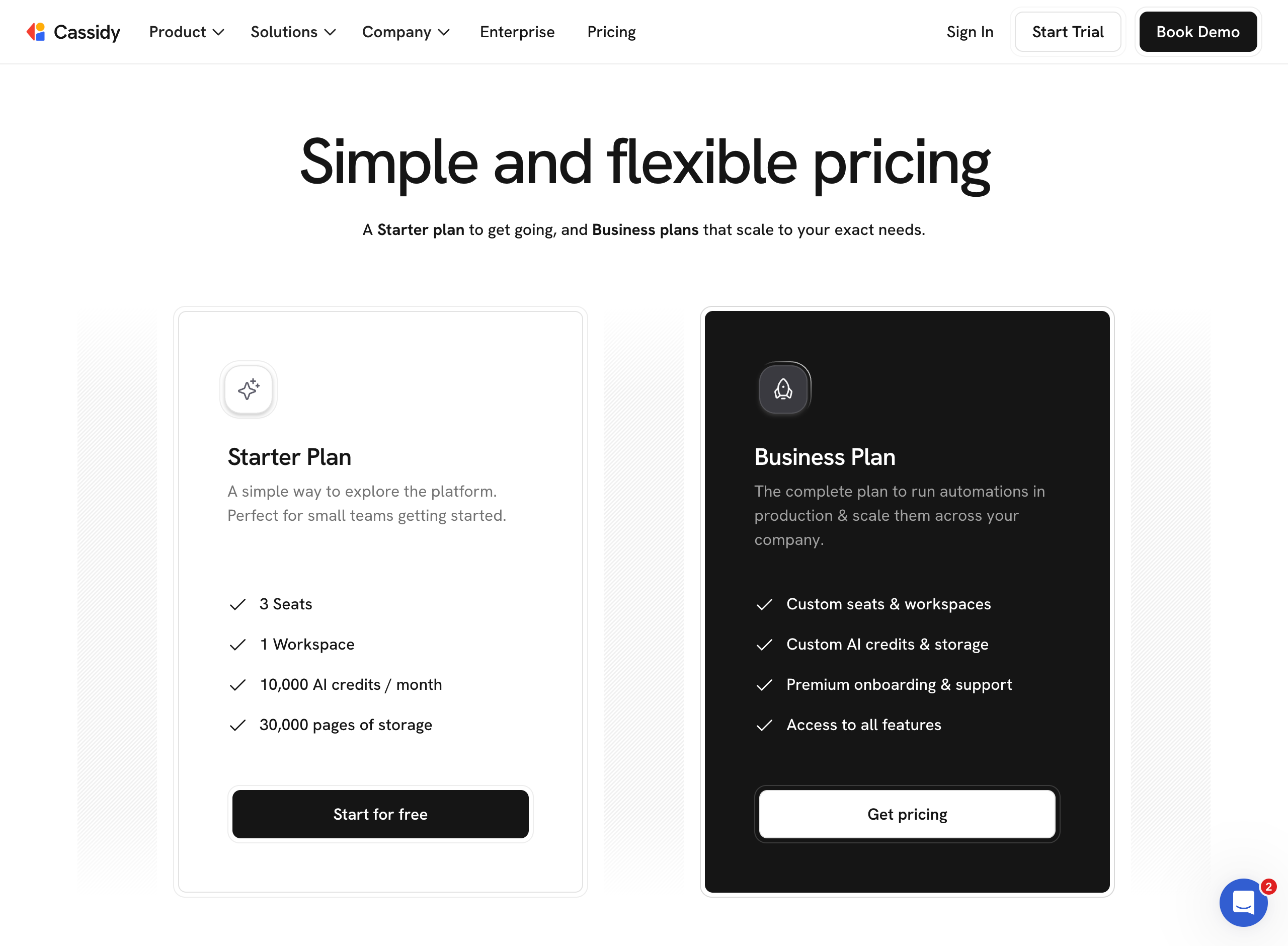
Starter: Free – 3 users, 5 agents, 5 workflows, 10K AI credits, basic integrations, 24-hour data sync.
Business: Custom pricing (book a demo) – custom users, agents, workflows, and credits, instant sync, advanced integrations, SSO, dedicated success manager, and white-glove onboarding.
Takeaway
Cassidy is a strong choice for enterprise teams that need AI agents with deep business context and strict compliance requirements. However, its opaque pricing and enterprise-heavy approach may be overkill for smaller teams. If you're looking for an easy-to-use AI agent builder with transparent pricing and strong human-in-the-loop features, Relay.app is a more accessible option that gets you up and running faster.
7.
Stack AI
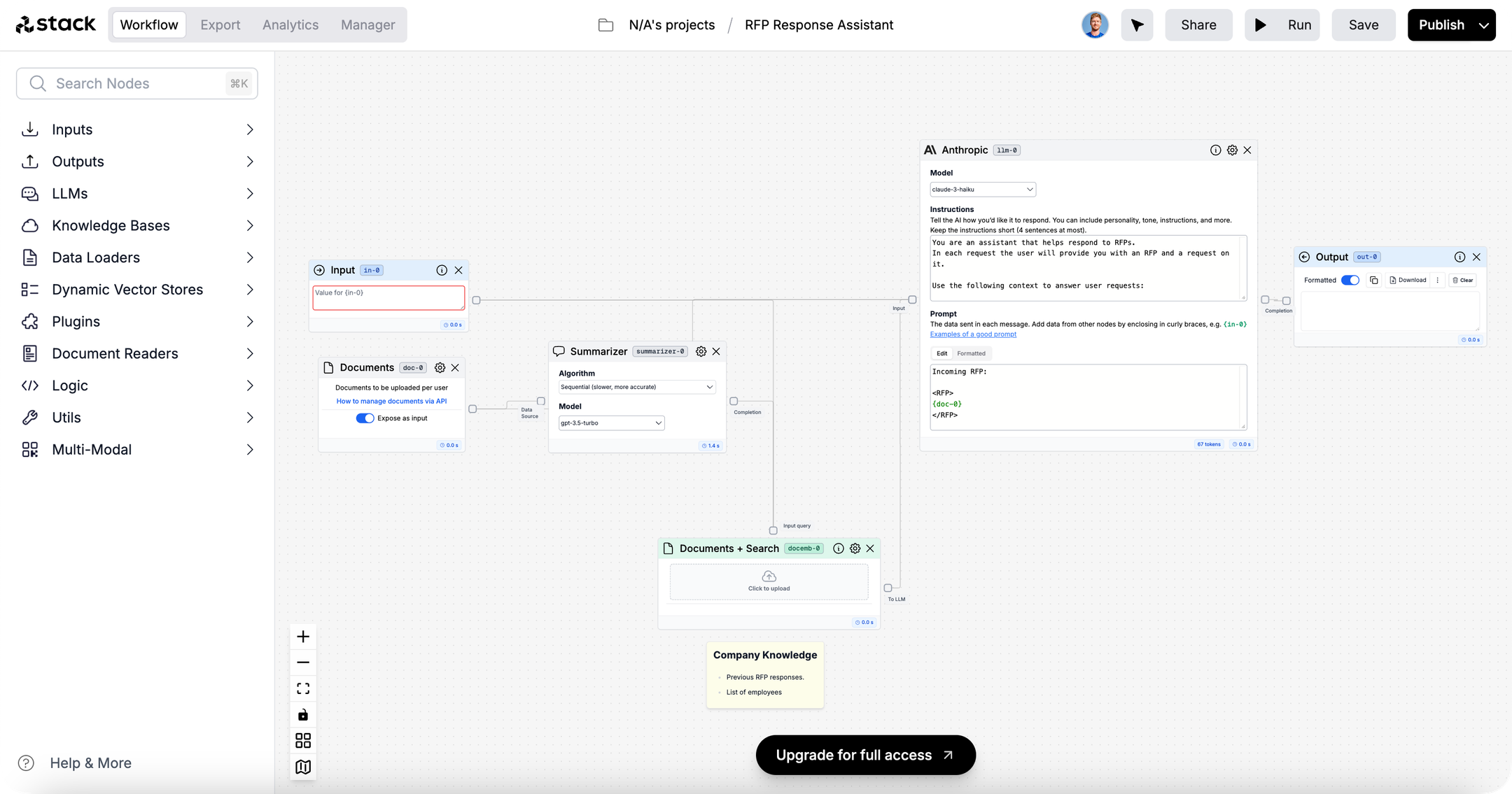
Stack AI is an enterprise-focused platform for building and deploying AI agents with a strong emphasis on security and governance. It offers a visual workflow builder for creating agentic workflows, 100+ enterprise integrations, and flexible deployment options including multi-tenant, VPC, and on-premise. The platform is certified for HIPAA, SOC 2 Type II, GDPR, and ISO 27001, making it a fit for regulated industries like healthcare, finance, insurance, and defense. Trusted by organizations like IBM, MIT, YMCA, BAE Systems, and Nubank, Stack AI positions itself as an "AI transformation platform" for IT and enterprise architecture teams. It also provides dedicated white-glove support from AI experts to help organizations scale their agent deployments.
✅ Pros
Enterprise-grade security certifications: HIPAA, SOC 2 Type II, GDPR, and ISO 27001 — ideal for regulated industries.
Flexible deployment options: Supports multi-tenant cloud, VPC, and on-premise deployments to meet strict data residency needs.
100+ enterprise integrations: AI agents can read, write, and execute tasks within existing enterprise systems.
Dedicated white-glove support: Hands-on guidance from AI experts throughout the deployment lifecycle.
❌ Cons
No mid-tier pricing plan: Only a limited Free tier and custom Enterprise — growing teams have no self-serve paid option to scale into.
Sales-driven model: Most meaningful features require booking a demo and negotiating custom pricing.
Very limited free plan: 500 runs/month, 2 projects, and 1 seat make it hard to evaluate the platform in depth before committing.
Steeper onboarding for smaller teams: The platform is built for IT and enterprise architecture teams, which may feel heavy for simpler use cases.
💰 Pricing
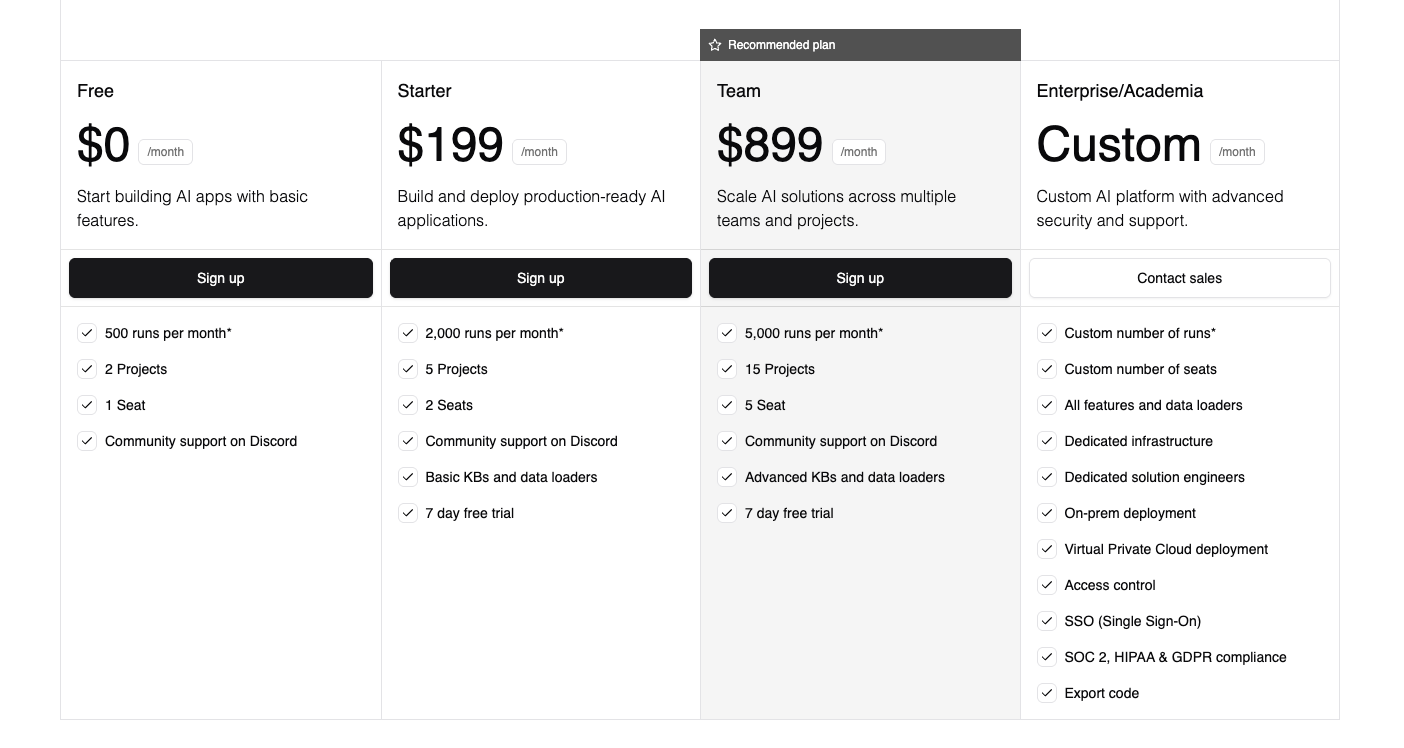
Free: $0/month — 500 runs/month, 2 projects, 1 seat, community support on Discord.
Enterprise: Custom pricing — custom runs, unlimited projects, custom seats, all features and data loaders, dedicated infrastructure, on-prem and VPC deployment, SSO, access control, SOC 2/HIPAA/GDPR compliance, dedicated solution engineers.
Takeaway
Stack AI is a strong option for large, regulated enterprises that need robust security certifications and flexible deployment (including on-prem). However, its enterprise-only pricing model and sales-driven approach mean it's not accessible for smaller teams or individuals looking to get started quickly. If you need an AI agent builder that's easy to pick up without a sales call and offers a generous free tier with self-serve upgrades, a platform like Relay.app is a much more approachable starting point.
8.
ActivePieces
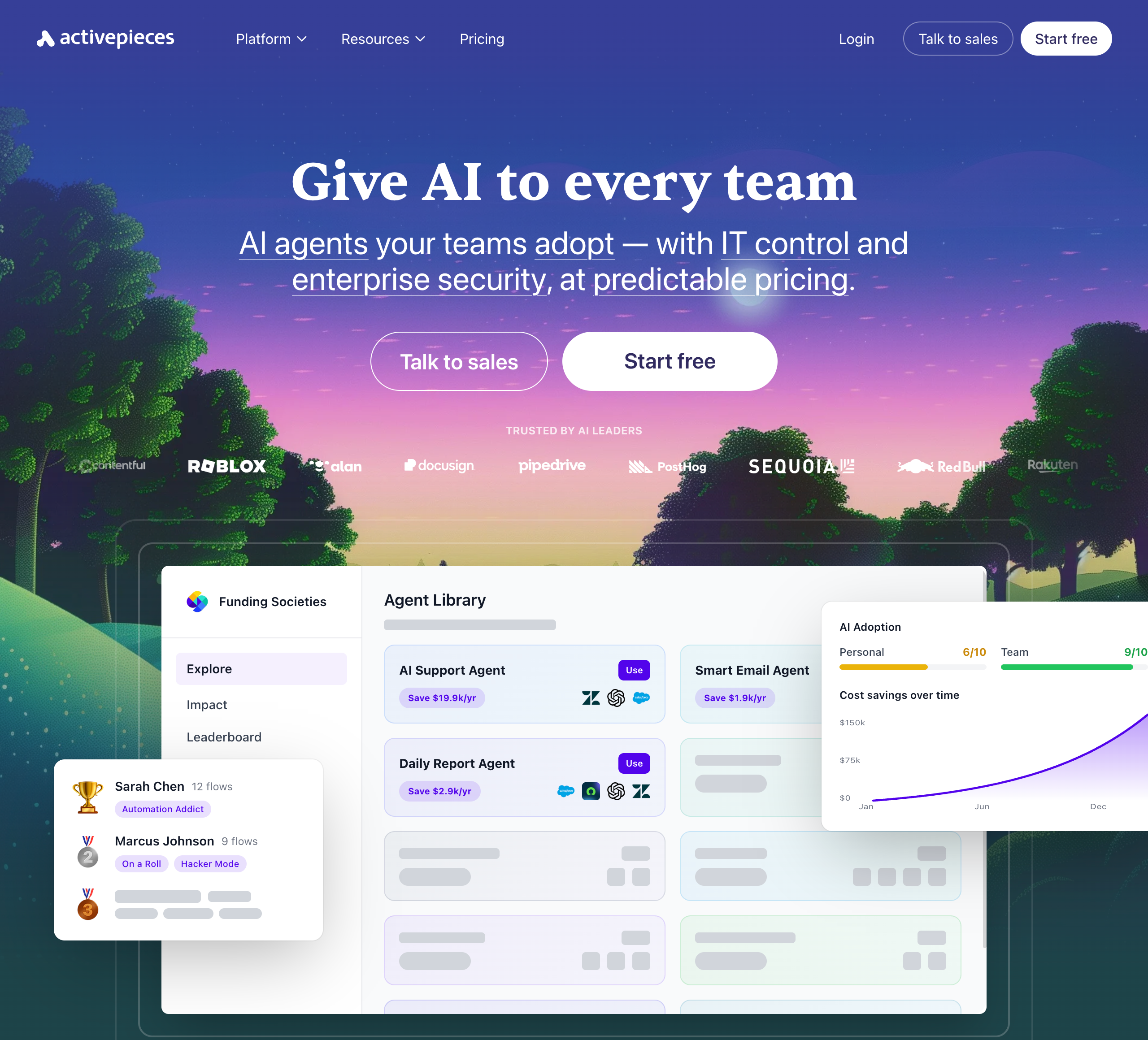
Activepieces is an open-source, AI-first automation platform that lets teams build AI agents and workflows without code. It offers 644+ integrations, an AI Agent Builder, and an AI Adoption Stack designed to drive organization-wide AI usage — complete with analytics, gamification, and a pre-built agent library. The platform emphasizes enterprise control with SSO, SCIM provisioning, custom RBAC, and audit logs, and can be deployed on Activepieces' cloud (SOC 2 Type II, GDPR) or self-hosted via Docker or Helm. Its open-source core (MIT licensed, 270+ contributors) appeals to technical teams who want full control over their automation infrastructure. However, its enterprise-oriented feature set and self-host focus may feel like overkill for smaller teams that just want a quick, simple way to build AI agents.
✅ Pros
• Open-source and self-hostable: MIT-licensed core with Docker and Helm support, giving technical teams full control over their data and infrastructure.
• 644+ integrations: Broad connector library covering major apps like Gmail, Slack, HubSpot, Salesforce, and OpenAI.
• AI Adoption Stack: Includes analytics, gamification, leaderboards, and a pre-built agent library to drive org-wide AI usage.
• Enterprise governance: SSO, SCIM, custom RBAC, audit logs, and SOC 2 Type II compliance for IT-controlled deployments.
❌ Cons
• Steeper learning curve: Self-hosting and advanced governance features add complexity that may overwhelm non-technical users.
• No human-in-the-loop controls: Lacks built-in approval or review steps to let you verify AI actions before they execute.
• Opaque pricing at scale: The Unlimited plan requires contacting sales, making it hard to predict costs for larger teams.
• Enterprise-heavy focus: Many headline features (SSO, SCIM, RBAC, audit logs) are geared toward large orgs, which can feel like overkill for small teams.
💰 Pricing
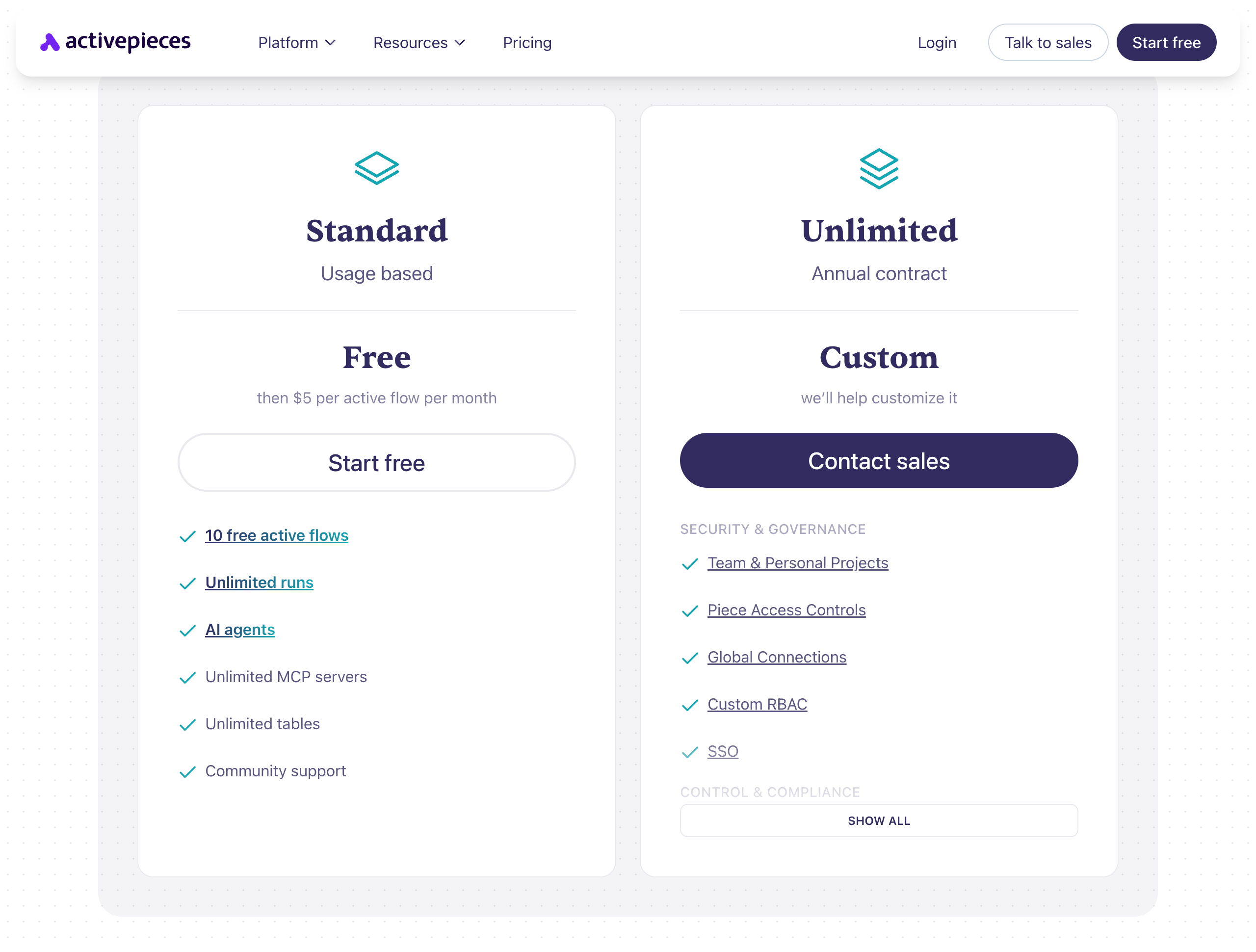
• Standard: Free to start – includes 10 free active flows, unlimited runs, AI agents, unlimited MCP servers, and unlimited tables. Then $5 per active flow per month.
• Unlimited: Custom pricing (annual contract) – includes team & personal projects, piece access controls, global connections, custom RBAC, SSO, audit logs, and dedicated support.
• Community Edition: Free, MIT-licensed, self-hosted – core features only, requires technical skills to deploy.
Takeaway
Activepieces is a solid choice for technical teams and enterprises that want an open-source, self-hostable automation platform with strong governance controls. Its AI Adoption Stack and agent library are unique differentiators for driving org-wide AI usage. However, if you're looking for the easiest way to build AI agents without managing infrastructure — and you want built-in human-in-the-loop controls to stay in charge of what your agents do — Relay.app is a simpler, faster alternative that lets you create agentic workflows in plain language from day one.
How to make your choice
Still not sure which platform you should pick? Here are some question you can ask yourself:
Question 1: What's your technical comfort level?
"I'm not technical" → Start with Relay.app. You can build agents using natural language without touching any technical configuration.
"I can follow tutorials and learn new tools" → Consider Gumloop or Zapier. These have visual builders that take some learning but don't require coding.
Question 2: How important is human oversight?
"Critical—AI can't take actions without my approval" → Relay.app has the best human-in-the-loop features. You can require approval before any action executes.
"I want visibility but don't need to approve everything" → Most platforms work here. Prioritize based on other factors.
Question 3: What tools do you need to connect?
"Mostly common tools (Google Workspace, Slack, CRMs, etc.)" → Any platform on this list will work. Choose based on ease of use and price.
"I need connections to obscure or legacy tools" → Zapier (7,000+ integrations) is your best bets.
"I primarily need AI capabilities, integrations are secondary" → Gumloop or Relevance.ai focus more on AI power than integration breadth.
Question 4: Is there anything else in particular you're optimizing for?
"Enterprise knowledge base" → Cassidy is a great way to create knowledge base assistance.
"Browser extension functionlity" → Bardeen works in your browser and has a highly polished user experience.
The bottom line
When picking an AI automation tool, focus on your unique needs, workflow complexity, ideal future outcomes, and the AI features that matter most. Dive into free tiers, explore, and don’t hesitate to test tools across categories to find the best match. The right tool won’t just save time and cut down errors — it’ll supercharge your business, giving you the edge to thrive in today’s fast-paced AI landscape.
If you want to get started with AI-powered cross-app integrations, like automatically parsing emails and adding them to a Google Sheet, going with an AI-integrated workflow automation tool is a smart move. Specifically, a tool like Relay.app stands out for its ease of use, flexibility, and power, making it ideal for both beginners and experienced users. With Relay.app’s built-in AI actions and human-in-the-loop capabilities, you can automate everything from simple tasks to complex workflows without the need for extensive setup.
Ready to start scaling your business with Relay.app? Sign up for free today.
FAQs
How does Relay.app's pricing work?
How does Relay.app compare to Zapier for AI automation?
What's the best AI automation tool for small businesses and solopreneurs?
What is human-in-the-loop automation and why is it important for AI workflows?
